


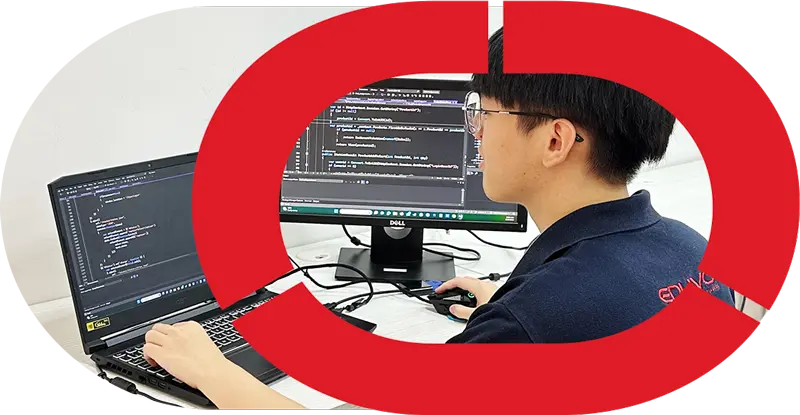


Eduvo Academy Facilities: What Students Use During Training
Eduvo Academy Facilities refer to the real training spaces and equipment students use for hands-on learning in Kuala Lumpur, including lab-based setups for hardware training, networking basics, troubl
Quick answer
Eduvo Academy Facilities refer to the real training spaces and equipment students use for hands-on learning in Kuala Lumpur, including lab-based setups for hardware training, networking basics, troubleshooting, and coding projects. These facilities support German Ausbildung-inspired training, Action Learning, and practical preparation for students aged 16 and above, with no SPM requirement for suitable pathways.
Key Takeaways
- Students learn in a real lab environment with practical IT training facilities in Malaysia.
- Training supports both IT Support and Software Engineering pathways through hands-on work.
- The academy welcomes students aged 16 and above, including those without SPM.
- Facilities are designed to support one-year programme learning in Sunway Velocity, Kuala Lumpur.

Eduvo Academy Facilities are designed to help students learn by doing, not just by listening. This guide explains what students actually use during training, why proper IT training facilities matter, and how a real lab environment supports practical learning for IT Support and Software Engineering pathways in Sunway Velocity, Kuala Lumpur. It is written for parents, SPM leavers, students without SPM, weak SPM students, and career changers who want a clear and honest overview of the learning environment at Eduvo Academy.
Students use a practical lab setup with real equipment, software tools, and guided project workflows so they can practise IT tasks the way they are done in training and workplace settings. In Eduvo Academy Facilities, the focus is on learning by doing: hardware training, networking basics, troubleshooting, and coding projects all happen in a structured environment that supports beginner-friendly progress.
At the provider’s Sunway Velocity, Kuala Lumpur location, students typically work with devices and tools that help them understand how systems are built, connected, tested, and repaired. That includes:
- Real lab equipment for basic hardware handling and assembly practice
- Network-related tools for learning connections, setup, and fault-finding
- Software environments for coding projects and task-based exercises
- Step-by-step supervision for Action Learning and German Ausbildung-inspired training
- Workplace-style routines that build discipline, teamwork, and technical confidence
This matters because IT training is not only about theory. Students need repeated practice with equipment and workflows so they can move from watching to doing. For parents and learners comparing IT training facilities Malaysia, the key question is whether the environment supports consistent practice, clear instruction, and realistic technical tasks.
The programmes supported in this setting include Professional Diploma in IT Support, Professional Diploma in Software Engineering, Professional Degree in Information Technology, and Professional Degree in Software Engineering. For readers who want the wider pathway first, see TVET IT course Malaysia: Complete 2026 Guide. The one-year programme structure is especially relevant for students who want a focused route into practical learning without a long academic delay.
The entry pathway is also designed to be accessible: suitable learners can apply with no SPM requirement, and the training centre welcomes students aged 16 and above. That makes it relevant for SPM leavers, weak SPM students, students without SPM, and career changers who want a clear starting point in IT.
In short, the facilities are built to support real practice, not just classroom explanation. Students use them to build confidence in technical basics, strengthen problem-solving, and prepare for the next stage of their learning journey in Klang Valley.
Why Do IT Training Facilities Matter in 2026?
IT training facilities matter because students learn faster when they can practise with real equipment, software tools, and workplace-style tasks instead of only reading slides. For learners in Malaysia, the right environment turns abstract concepts into repeatable skills that are easier to understand, remember, and apply.
Real equipment vs theory-only learning
In 2026, IT roles are still built around practical problem-solving. That is why a training centre needs more than a classroom and a projector. Students should be able to handle real lab equipment, connect devices, test systems, and work through common issues such as configuration errors or network interruptions.
At this stage, facilities support learning in areas like hardware training, networking basics, troubleshooting, and coding projects. These are not just topics to memorise; they are tasks students need to practise step by step. A learner in Professional Diploma in IT Support may need to identify a faulty connection, follow a checklist, and verify a fix. Someone in software training may need to test code, correct errors, and review how a project moves from planning to implementation.
This matters even more for students comparing IT training facilities Malaysia-wide, because the quality of the learning environment affects how much real practice they can get. The provider’s Sunway Velocity Kuala Lumpur location also makes the setup relevant for families and students in Klang Valley who want accessible training without leaving the city.
Facilities are essential because technical skills are built through repeated practice, not observation alone.
The German Ausbildung-inspired training model reinforces this idea by combining structured learning with practical application, which is why readers may also find Ausbildung Malaysia: German-Style IT Training helpful when comparing pathways.
Why workplace-style practice builds confidence
Workplace-style practice helps students move from “I understand the topic” to “I can do the task.” That shift is important for beginners, career changers, and students without SPM who may need a more supportive route into IT. It is also valuable for age 16 and above learners who want a clear, one-year programme that keeps learning focused and practical.
When students work through realistic technical tasks, they learn how to follow instructions, manage time, and solve problems under guided supervision. That kind of Action Learning supports the development of habits that matter in future study and work, especially in pathways such as Professional Diploma in Software Engineering, Professional Degree in Information Technology, and Professional Degree in Software Engineering.
For parents, this is reassuring because it shows that the training centre is not only teaching theory. It is helping students build discipline, technical fluency, and confidence in a setting that reflects how IT work is actually done.
What Should You Check in an IT Academy Campus Visit?
A good campus visit should show you whether students can practise with real equipment, use relevant software, and learn in a space that feels organised and supportive. For parents, SPM leavers, and career changers, the main question is simple: can this training centre help a beginner build practical IT skills in a realistic environment?
Lab equipment and software environment
Look closely at the Professional Diploma in IT Support pathway and ask what students actually use during class. You should be able to see real lab equipment, not just posters or presentation slides.
- Desktop computers that students can access for practice
- Networking hardware for hardware training and networking basics
- Cables, routers, switches, or similar devices used for troubleshooting
- Software tools for coding projects and technical exercises
- A setup that supports Action Learning, where students practise tasks step by step
- Enough devices for students to work in small groups without long waiting time
- Clear examples of how one-year programme lessons move from theory to practice
If the provider says it follows German Ausbildung-inspired training, ask how that idea appears in daily learning. In a practical setup, students should be doing workplace-style tasks such as setting up devices, checking connections, and fixing common errors with guidance.
Student support and learning atmosphere
A visit should also show whether the learning atmosphere is calm, beginner-friendly, and suitable for age 16 and above learners, including those with no SPM requirement. Ask how the team supports students who are new to IT or who need extra time to build confidence.
- Is there a clear timetable and structured lesson flow?
- Do trainers explain concepts in simple, direct language?
- Are students encouraged to ask questions during class?
- Is there support for learners in Professional Diploma in Software Engineering and the related IT pathways?
- Do you see a respectful, focused environment where students stay engaged?
- Are there signs that the programme supports both weak SPM students and adult learners?
For families in Klang Valley, a visit to the Sunway Velocity Kuala Lumpur location can also help you judge whether the commute, class setting, and daily routine feel manageable.
Safety, cleanliness, and accessibility
Parents should check whether the space feels safe, tidy, and easy to navigate. Clean labs and organised work areas matter because students need to focus on learning rather than dealing with clutter or confusion.
- Are cables, chairs, and devices arranged neatly?
- Is the room bright enough for reading screens and working on equipment?
- Are walkways clear and equipment stored properly?
- Is the environment suitable for regular student use over a one-year programme?
- Can beginners move around the room comfortably and safely?
- Does the space feel professional enough for a serious IT training environment?
When you visit Eduvo Academy campus facilities, use these checks to judge whether the setting supports real learning, practical skill-building, and steady progress toward IT training facilities Malaysia parents can trust for their children’s growth.
How Do Eduvo Academy Facilities Support IT Support and Software Engineering?
They support both pathways by giving students a place to practise with real equipment, software tools, project workflows, and workplace-style technical tasks. For a one-year programme, that matters because learners need repeated practice, not just theory, to build confidence and job-ready habits.
IT Support training needs
IT Support students need facilities that let them work with hardware training, networking basics, device setup, and troubleshooting in a structured way. In practice, that means room for checking cables, identifying faults, testing connections, and learning how to solve common user problems step by step.
A good training centre should also make it easy for beginners to move from observation to action. For example, students may first learn how a desktop is assembled, then practise basic diagnostics, then move into network configuration and support tickets. This is especially relevant for learners entering through the no-SPM requirement route and for age 16 and above students who may be new to technical learning.
For parents comparing options in Klang Valley, IT Support Course Sunway Velocity 2026 Guide can help explain how the environment supports practical learning at the Sunway Velocity Kuala Lumpur location.
Software Engineering training needs
Software Engineering students need a different kind of space, but the same practical approach. They benefit from computer access for coding projects, version-control habits, testing, debugging, and group collaboration. The room should support focused work as well as short team discussions, because software tasks often move between individual coding and shared review.
The provider’s Professional Diploma in Software Engineering and Professional Degree in Software Engineering pathways should therefore be supported by facilities that allow students to write code, test applications, fix errors, and present project progress clearly. The same applies to the Professional Diploma in IT Support and Professional Degree in Information Technology, where students may need to switch between technical tasks and communication with peers or trainers.
How Action Learning fits both pathways
German Ausbildung-inspired training works well when facilities are used for Action Learning: learn a concept, practise it, review the result, and improve it again. That cycle suits both IT support and software development because each field depends on repetition, feedback, and real task completion.
| IT Support | Software Engineering |
|---|---|
| Hardware checks, device setup, and fault finding | Coding, testing, and debugging |
| Networking basics and connection troubleshooting | Project workflows and version control habits |
| Repair-style practice and support scenarios | Collaborative build-and-review sessions |
| Clear step-by-step technical tasks | Structured problem-solving and iteration |
For families visiting the provider in Sunway Velocity Kuala Lumpur, this is the key question: do the spaces help students practise, think, and improve in a way that matches real training needs? If the answer is yes, then the facilities are doing their job.
Frequently Asked Questions
Why do IT training facilities matter for beginners?
What do students actually use during training?
Is this suitable for students without SPM or with weak SPM results?
Which programmes use these facilities?
What should parents look for when visiting?
References
- Eduvo Academy — Eduvo Academy
- About Eduvo Academy | IT & Business Training in Malaysia — About Eduvo Academy | IT & Business Training in Malaysia
- Professional Degree in Software Engineering | Eduvo Academy — Professional Degree in Software Engineering | Eduvo Academy


