


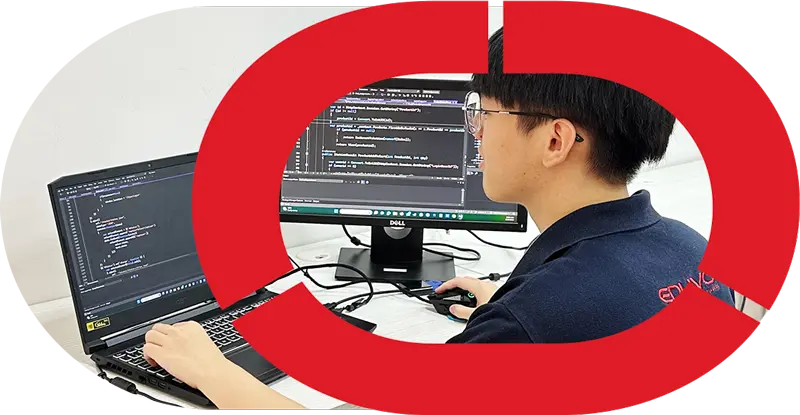


Eduvo Academy IT Wonder Lab: Real Equipment Training Explained
Eduvo Academy IT Wonder Lab is a hands-on IT lab in Sunway Velocity, Kuala Lumpur where students learn through real equipment training, practical IT lab Malaysia activities, and Action Learning before
Quick answer
Eduvo Academy IT Wonder Lab is a hands-on IT lab in Sunway Velocity, Kuala Lumpur where students learn through real equipment training, practical IT lab Malaysia activities, and Action Learning before internship or entry-level work. It supports beginners in hardware training, networking basics, troubleshooting, and coding projects across IT Support and Software Engineering pathways.
Key Takeaways
- Real equipment training helps students practise with actual IT devices, tools, and lab-based tasks.
- The Wonder Lab supports beginner-friendly learning in hardware, networking basics, troubleshooting, and coding projects.
- Eduvo Academy offers a practical pathway with no SPM requirement, age 16 and above, and a one-year programme structure.
- The training approach is designed for IT Support and Software Engineering progression, with internship pathway preparation through consistent attendance and practice.

Eduvo Academy IT Wonder Lab is designed to give beginners a clearer view of how IT support and software engineering are learned in practice, not just in theory. It uses real equipment training, Action Learning, and guided lab sessions to help students build confidence with hardware, networking basics, troubleshooting, and coding projects. This opening guide explains what the lab is, who it suits, and why steady attendance and effort matter for getting real value from the experience. It is written for parents, SPM leavers, students without SPM, weak SPM students, and career changers who want a transparent look at practical IT training in Sunway Velocity Kuala Lumpur.
What is Eduvo Academy IT Wonder Lab?
Eduvo Academy IT Wonder Lab is a practical learning space where students study IT by using real equipment, not just slides or notes. It is designed to help beginners understand how hardware, networking, and software work together in everyday technical tasks.
A practical lab for beginner-friendly learning
This training centre is built for students who need a clearer, slower, and more guided start in IT. Instead of only memorising terms, learners see how devices connect, how systems behave, and how common problems are handled in a structured environment. That makes it especially useful for parents and students who want practical IT training with a supportive pace.
The learning model also fits students who are exploring a future in IT Support or Software Engineering. The provider offers a one-year programme structure, with entry designed for learners aged 16 and above and no SPM requirement. For readers who want a wider view of how this pathway fits into Malaysia’s TVET route, TVET IT course Malaysia: Complete 2026 Guide is a useful next step.
What students do inside the lab
Inside the lab, students work on real equipment training activities that build confidence step by step. They may handle hardware training tasks such as identifying ports, checking device connections, and understanding basic components. They also practise networking basics, including cable testing, device setup, and simple network troubleshooting.
For software-focused learning, students do coding projects and guided exercises that connect theory to action. This is where Action Learning becomes important: students learn by doing, correcting mistakes, and repeating tasks until the process feels more natural. That approach is especially helpful for learners who are new to IT or who did not do well in school-based theory learning.
The programme is also aligned with German Ausbildung-inspired training, which means learning is structured around practical application and workplace readiness. Students are not expected to know everything at the start. Instead, they build skills through guided practice, regular attendance, and steady improvement.
This pathway includes preparation for a Professional Diploma in IT Support, a Professional Diploma in Software Engineering, a Professional Degree in Information Technology, and a Professional Degree in Software Engineering. It also supports an internship pathway, helping students understand how classroom learning connects to real work expectations.
For learners based in Kuala Lumpur, the training centre is located at Sunway Velocity Kuala Lumpur, making it accessible for students who want a local, practical route into IT.
Why does real equipment training matter for IT students?
Real equipment training matters because it helps students build confidence by working with actual hardware, software, and troubleshooting steps instead of only reading about them. This makes practical IT training more memorable, more realistic, and more useful when students move into workplace settings.

With real devices in front of them, learners can see how a computer is assembled, how cables and ports connect, how systems respond to errors, and how small mistakes affect performance. That experience is especially valuable for beginners, weak SPM students, and students without SPM, because it turns abstract lessons into clear actions they can repeat and understand.
| Theory-only learning | Real equipment training |
|---|---|
| Students may understand concepts but still feel unsure when using devices | Students gain confidence by handling hardware directly |
| Troubleshooting stays theoretical | Students practise diagnosing faults, restarting systems, and checking connections |
| Networking basics can feel abstract | Students see routers, switches, cables, and setup steps in context |
| Coding lessons may stay on screen | Students connect coding projects to real systems and testing |
| Workplace readiness can be limited | Students learn how IT tasks are done in actual work environments |
For example, hardware training can include identifying parts, installing components, checking power issues, and understanding why a system fails to start. Networking basics become clearer when students trace a connection, test a setup, and learn how devices communicate. Troubleshooting also becomes more practical when they are asked to solve common issues such as loose connections, software errors, or login problems step by step.
This is where the provider’s Eduvo Academy IT Wonder Lab approach stands out as a practical learning environment. It supports Action Learning by letting students practise, make corrections, and improve through guided repetition. For parents and students comparing options, this is also a useful topic to explore alongside TVET IT course Malaysia: Complete 2026 Guide, which explains how practical IT learning fits into the wider Malaysian pathway.
The result is not just better technical understanding, but stronger workplace readiness. Students become more comfortable asking questions, following instructions, and handling tasks with real tools. That confidence matters in any internship pathway, especially in a one-year programme designed for learners aged 16 and above, including those entering Professional Diploma in IT Support, Professional Diploma in Software Engineering, Professional Degree in Information Technology, or Professional Degree in Software Engineering.
How does the IT Wonder Lab help IT Support students?
It helps IT Support students learn by doing, so they can build confidence with real devices, real settings, and real troubleshooting steps. Instead of memorising answers, they practise how to diagnose problems, fix common issues, and explain solutions clearly to users.
Hardware diagnostics and device setup
In a practical IT lab Malaysia setting, students start with the basics that every support role needs: identifying computer parts, checking cables, testing peripherals, and setting up desktops correctly. This is especially useful for learners who are new to IT, because it turns abstract topics into clear routines they can repeat.

Typical lab activities include:
- hardware training for desktops, monitors, keyboards, printers, and other common devices
- device setup and first-time configuration
- checking power, display, and connection issues
- basic system maintenance and safe handling of equipment
- installing and updating common software used in support work
These tasks help students understand how systems behave in real situations, not just in diagrams. For parents and students comparing pathways, this is also a good time to review IT Support Course Sunway Velocity 2026 Guide for a closer look at the support-focused route in Kuala Lumpur.
Networking basics and troubleshooting practice
IT Support work often involves simple network checks, so students need practice with the fundamentals. The lab supports networking basics such as connecting devices, understanding IP settings at a beginner level, and checking whether a device is linked properly to a network.
Students also learn how to spot common faults, such as:
- loose or incorrect network connections
- Wi-Fi or login access problems
- software errors that affect daily use
- printer or shared-device connection issues
- slow performance caused by basic configuration problems
This kind of repeated practice is valuable because support staff are expected to stay calm, ask the right questions, and follow a step-by-step process. That is why the provider’s Professional Diploma in IT Support uses practical exercises to prepare learners for workplace expectations.
Helpdesk-style scenarios and maintenance tasks
The training centre also uses helpdesk-style scenarios so students can practise responding like entry-level IT support staff. They may be asked to handle a user who cannot log in, a device that will not start, or a system that needs routine maintenance.
These exercises strengthen communication as well as technical skill. Students learn to document issues, confirm the problem, test possible causes, and complete basic fixes in a structured way. For learners aged 16 and above, including those with no SPM requirement, this makes the pathway more accessible while still staying focused on real workplace habits.
With German Ausbildung-inspired training and an internship pathway built into the one-year programme, students in Sunway Velocity Kuala Lumpur get a clearer bridge from classroom learning to practical IT support work.
How does the IT Wonder Lab help Software Engineering students?
It helps software engineering students move from theory to real coding practice, so they can build, test, and improve projects with immediate feedback. In a practical IT lab Malaysia setting, learners see how code behaves on actual devices and systems, which makes debugging, teamwork, and project delivery much easier to understand.
Coding projects and development workflow
For software engineering learners, the lab is more than a classroom with computers. It is a place to practise the full development workflow: planning a feature, writing code, checking requirements, and refining the final result. Students in the Professional Diploma in Software Engineering can work on coding projects that reflect how software is built in stages, not all at once.
That matters because beginners often understand syntax but struggle to connect code with real outcomes. In the lab, they can try simple programs, build small application features, and learn how one change affects the rest of the system. This is especially useful for students comparing study options in Software Engineering Course Sunway Velocity 2026.
Debugging, testing, and teamwork
Software development is not only about writing code. It is also about finding errors, testing fixes, and working with others to solve problems. The provider’s training environment supports this by letting students practise debugging in a realistic setting, where mistakes are normal and part of learning.
This kind of practice helps students become more careful and more confident. They learn to read error messages, trace problems step by step, and test whether a solution actually works. For parents and students who want practical IT training without a heavy academic barrier, this approach is especially helpful because it supports learners aged 16 and above, including those with no SPM requirement.
Using Git and project-style practice
Project-style learning also introduces habits that software teams use every day, such as version control and structured collaboration. Students can experience how changes are tracked, reviewed, and improved over time instead of saving only one final file.
| Lab/project activities for software engineering students | What they would miss without a practical environment |
|---|---|
| Writing and updating code in stages | Learning only from notes without seeing how code changes affect a live project |
| Testing features and fixing bugs | Missing the habit of checking, correcting, and rechecking work |
| Working on group tasks and shared files | Less exposure to team communication and project coordination |
| Practising software workflow from start to finish | Weaker understanding of how coding projects move from idea to delivery |
This kind of real equipment training supports German Ausbildung-inspired training and the internship pathway built into the one-year programme. For students at Sunway Velocity Kuala Lumpur, it offers a clearer bridge from classroom learning to the practical expectations of software work.
Is practical IT training enough on its own?
No. Practical IT training is a strong foundation, but students still need guided theory, soft skills, and steady practice to become ready for real workplace tasks. A good programme blends lab time with structured learning so students understand not just how to do something, but also why it works.
What students still need to do
Practical learning is most effective when students keep building three things outside the lab: understanding, communication, and consistency. For example, a student who can replace a component or follow a setup process still needs to learn how to explain the issue clearly to a supervisor, document what was done, and avoid repeating the same mistake.
That is why the provider’s Professional Diploma in IT Support and related pathways should be seen as more than equipment practice alone. Students still need to strengthen basics such as system concepts, safety habits, customer communication, and problem-solving discipline. These skills matter whether they are doing hardware training, networking basics, or troubleshooting on a live machine.
For software learners, practical work should also be paired with planning and reflection. Coding projects are useful, but students must learn to read instructions carefully, test changes step by step, and accept feedback. This is where Action Learning helps: students try, review, correct, and improve in cycles instead of waiting passively for answers.
Is practical IT training enough for beginners?
It is enough to start building confidence, but not enough by itself to prepare someone fully. Beginners still need theory, repeated practice, and guidance so they can understand what they are doing and apply it in different situations.
What should students expect from a one-year programme?
A one-year programme should give focused exposure to real tasks, regular feedback, and a clear internship pathway. It should help students move from basic understanding to practical readiness in a structured way.
Can students without SPM still benefit?
Yes. With no SPM requirement and age 16 and above, students can begin with a more accessible route into IT learning, then build skills through guided practice and progressive assessments.
How parents can judge a good hands-on course
Parents should look for clear progression, not just attractive lab photos. A solid course should show what students will learn at each stage, how they are assessed, and how practical work connects to career pathways such as the Professional Diploma in Software Engineering, Professional Degree in Information Technology, and Professional Degree in Software Engineering.
It is also wise to check whether the programme is transparent about student support, internship preparation, and entry requirements. A strong option should be suitable for weak SPM students, career changers, and students without SPM, while still maintaining structure and expectations. At Sunway Velocity Kuala Lumpur, this kind of practical IT training can feel more approachable because students see a direct path from classroom tasks to workplace habits.
For families comparing options, the key question is simple: does the course help the student think, practise, explain, and improve? If it does, then the learning is doing more than teaching tools — it is building readiness.
If you want a clear, supportive route into IT, explore Eduvo Academy’s main offering and see how the one-year Professional Diploma in IT Support can help students begin with confidence.
Frequently Asked Questions
How does real equipment training help IT students learn faster?
What is a practical IT course for beginners?
Can students without SPM join Eduvo Academy IT Wonder Lab?
Where is Eduvo Academy IT Wonder Lab located?
Who should consider Eduvo Academy IT Wonder Lab?
References
- Eduvo Academy — IT Wonder Lab at Eduvo Academy | Hands-On IT Learning — Eduvo Academy — IT Wonder Lab at Eduvo Academy | Hands-On IT Learning
- CompTIA Educational Foundation — IT Training Programs — CompTIA Educational Foundation — IT Training Programs
- California Institute of Applied Technology — Interactive IT Learning Lab Kits — California Institute of Applied Technology — Interactive IT Learning Lab Kits
- Extreme Networks — Training — Extreme Networks — Training
- International Society of Automation — Hands-On Portable Laboratories — International Society of Automation — Hands-On Portable Laboratories


